
AI-Powered SketchUp Workflows
4-Session Live Virtual Mini-Course
December 9, 16, 23, 2026 & January 6, 2027
3:00–4:30 PM ET
$399 · Recordings Included
A practical, live course for SketchUp users who want to understand how AI can actually improve their day-to-day design workflow—without replacing the parts of SketchUp that already work.
If you’re already comfortable modeling in SketchUp but keep wondering where tools like AI image generation, ChatGPT, model analysis, automated workflows, and AI-assisted visualization fit into your process, this course is for you.
Over four live sessions, I’ll show you the AI workflows I’m actually using and testing around SketchUp—from generating and refining design ideas to creating visuals, working with reference imagery, reviewing models, building assets, and speeding up repetitive work.
The goal isn’t to chase every new AI tool. It’s to figure out which tools are genuinely useful, when to use them, and how to fit them into a SketchUp-centered workflow without creating more work for yourself.
AI-Powered SketchUp Workflows
4-Session Live Virtual Mini-Course
December 9, 16, 23, 2026 & January 6, 2027
3:00–4:30 PM ET
$399 · Recordings Included
Who This Is For
AI-Powered SketchUp Workflows is designed for current SketchUp users who want to work faster, explore ideas more easily, and make better use of the growing number of AI tools around design and visualization.
It’s a good fit if:
- You already use SketchUp for real projects.
- You’re curious about AI but aren’t sure which tools are actually worth learning.
- You’ve experimented with AI rendering or image generation but struggle to get consistent results.
- You want to use AI without losing control of your SketchUp model or design intent.
- You’re interested in using AI for more than just pretty pictures.
- You want practical workflows you can adapt to your own design process.
This course is especially useful for architects, interior designers, landscape designers, exhibit designers, contractors, design-build professionals, and other SketchUp users working with real projects.
What You’ll Be Able to Do by the End
By the end of the course, you’ll have a clearer understanding of how to:
- Use AI alongside SketchUp rather than treating it as a separate workflow
- Generate and refine design ideas from models, screenshots, images, and project references
- Create faster concept and presentation visuals without always building a full traditional rendering workflow
- Keep AI-generated imagery closer to your actual SketchUp model and design intent
- Use AI to help analyze, review, troubleshoot, or think through model and workflow problems
- Explore AI-assisted materials, textures, assets, and reference content
- Identify repetitive tasks that AI can help simplify
- Decide when not to use AI because SketchUp or another traditional tool is still the better solution
That last bullet is important. I would make “where AI fits—and where it doesn’t” one of the central themes of this course.
Meet Your Teacher
I’m Dan, founder of SketchUpTrainer.com. I’m an educator, designer, and SketchUp expert who has been teaching and working with SketchUp since 2007.
- Nearly 20 years of SketchUp training and consulting experience
- 10 years teaching SketchUp at the college level
- Thousands of architects, designers, and contractors trained

“I’m interested in AI when it solves a real problem—not because it’s AI.
My approach is to start with the SketchUp workflow you already have, identify where you’re losing time or getting stuck, and then figure out whether AI actually gives us a better way to do it.”
What We’ll Cover
Session 1 – Where AI Actually Fits in a SketchUp Workflow
Start with the bigger picture before diving into tools.
- What AI is currently good at—and what it still struggles with
- The difference between AI inside SketchUp and AI around SketchUp
- Identifying useful AI opportunities in your existing workflow
- Working with text, images, SketchUp screenshots, and model information
- When a traditional SketchUp workflow is still the better choice
Session 2 – AI for Design Exploration, Assets & Model Development
Use AI earlier in the process—not just at the end for rendering.
- Generating and refining design ideas
- Working from reference photos and existing project imagery
- Creating materials, textures, and visual references
- Exploring image-to-3D and asset-generation workflows
- Using AI to support modeling decisions and problem-solving
- Evaluating generated content before bringing it into a production model
Session 3 – AI Visualization Without Losing the Model
This is probably one of your strongest sessions commercially.
- Turning SketchUp views into AI-assisted presentation imagery
- Concept visuals vs. model-faithful visuals
- Controlling materials, lighting, environment, and design direction
- Refining an image without unintentionally redesigning the project
- Comparing AI visualization workflows with traditional rendering
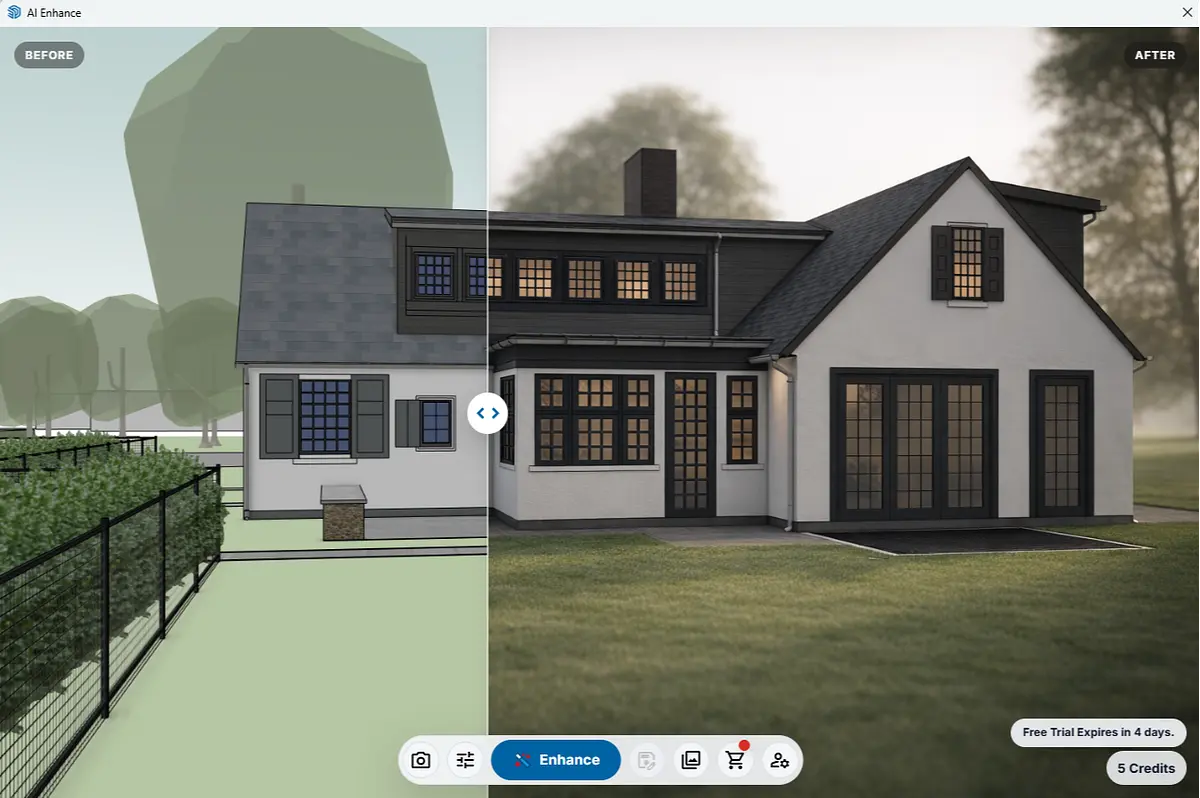
- Using tools such as AI Enhance and other current AI visualization options
Session 4 – Build AI Into Your Real Workflow
Bring everything together around practical use.
- Model review and workflow troubleshooting
- Using AI as a second set of eyes
- Repetitive tasks, documentation, and workflow assistance
- Building reusable prompts and repeatable processes
- Connecting multiple AI tools without creating a complicated system
- Real examples and live problem-solving
- Developing your own AI + SketchUp workflow going forward
"You won’t be watching a parade of AI demos just because they look impressive. I’ll show you where each workflow fits, why I would—or wouldn’t—use it, and how it connects back to real SketchUp work."
What’s Included + How It Works
In this live online course, you get:
- 4 live sessions (90 minutes each)
Practical demonstrations, real workflows, and live problem-solving. - Recordings of every session
Revisit workflows later or take the course primarily through the recordings. - Downloadable resources and workflow references
Prompts, examples, files, and supporting material you can adapt to your own work. - Live Q&A in every session
Bring questions about tools, workflows, models, or AI experiments you’re already trying.
Attend Live or Learn on Your Own Schedule
All four sessions are recorded and shared shortly after class, so you can attend live, watch later, or use a mix of both.
Some participants attend every session live, while others enroll knowing they’ll primarily work through the recordings on their own schedule. Both approaches work, and you’ll receive the same lessons, demonstrations, files, and course resources either way.
Live Q&A and direct support are available during the scheduled course dates. If you work through the recordings later, you’ll still have access to the complete course material.
Requirements
To get the most out of AI-Powered SketchUp Workflows, you should have:
- SketchUp Pro 2026 installed on a desktop or laptop
- A basic working knowledge of SketchUp navigation, modeling, groups/components, and scenes
- A stable internet connection
- A willingness to experiment with browser-based and desktop AI tools
This is not a beginner SketchUp course.
If you’re still learning the basic tools or struggling with fundamental model organization, SketchUp 101 is likely the better starting point.
If you’re unsure whether this class is right for you, please reach out before registering—
I’m happy to answer any questions or help you choose the best fit. If you encounter difficulties during the course, I’m committed to providing support so you can get the most out of the experience.
Frequently Asked Questions
Do I need previous AI experience?
No. You should be comfortable using SketchUp, but you do not need prior experience with AI tools. I’ll introduce the workflows as we use them and explain why each tool is being used.
Is this a rendering course?
No. AI visualization is an important part of the course, but we’ll also look at AI for design exploration, assets, model review, problem-solving, and workflow assistance.
Will we use AI Enhance?
Yes, AI Enhance will be one of the workflows demonstrated, particularly when we look at creating visuals that stay connected to the underlying SketchUp model. We’ll also look at other AI approaches where they make sense.
Do I need to pay for additional AI software?
Some tools may offer free access or trials while others may require credits or subscriptions. I’d make a current tool list available before the course begins so participants can decide which tools they want to use. You do not need to subscribe to every tool demonstrated.
Will the course still be useful if AI tools change?
Yes. The course is intentionally built around workflow decisions and repeatable processes, rather than memorizing one specific AI interface. Individual tools will change, but the underlying questions—what input to use, how to control the result, how to evaluate it, and where it belongs in the SketchUp process—remain useful.
Can I bring questions from my own project?
Yes. Live Q&A is part of every session, and real project questions are encouraged. This is not private project consulting, but practical examples often make the best teaching material.
What if I can’t attend live?
Every session is recorded. You can attend live, work entirely from the recordings, or use a combination of both.
